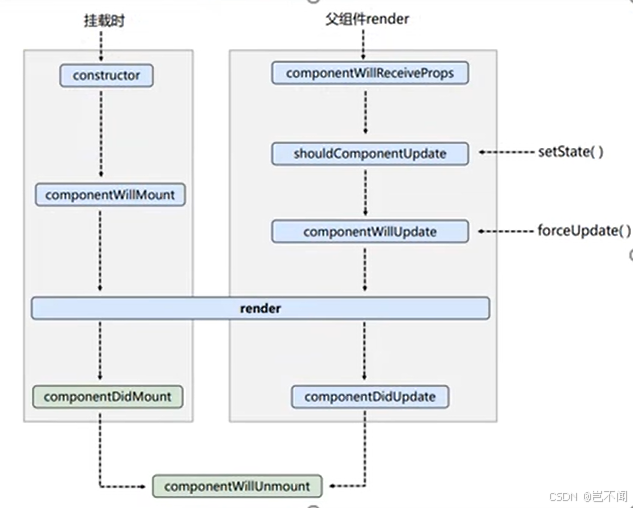
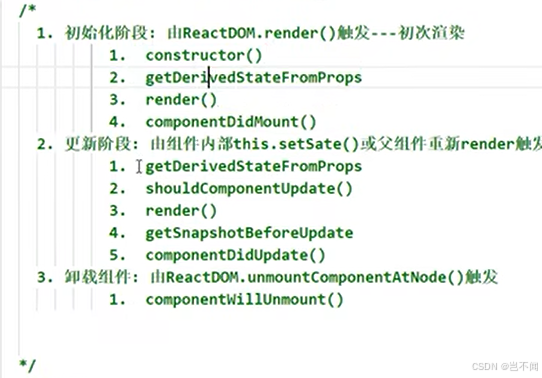
1.react生命周期(旧版)
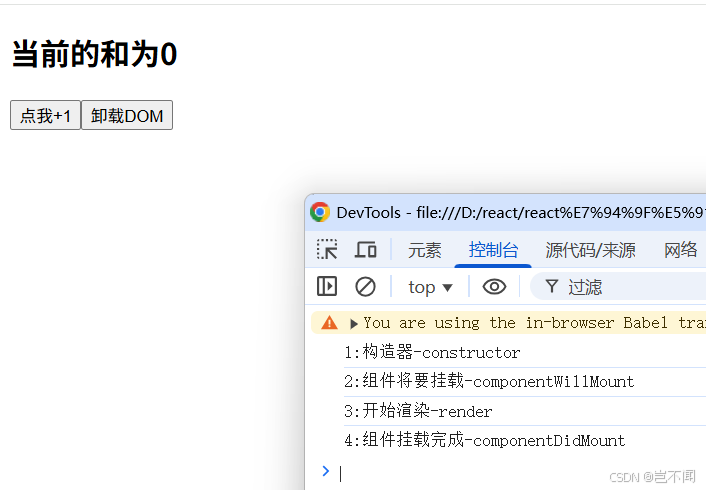
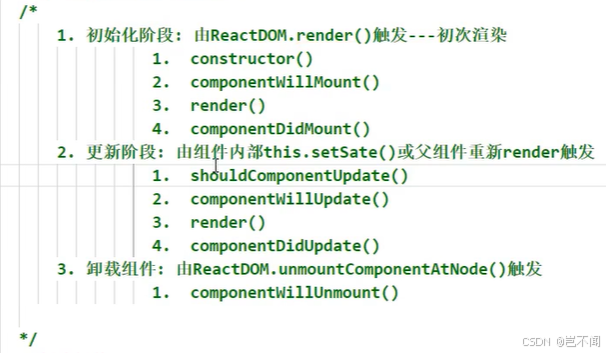
1.1react初始挂载时的生命周期
1:构造器-constructor- // 构造器
- constructor(props) {
- console.log('1:构造器-constructor');
- super(props)
- // 初始化状态
- this.state = {count: 0}
- }
- // 组件将要挂载
- componentWillMount() {
- console.log('2:组件将要挂载-componentWillMount');
- }
- render(){
- console.log('3:开始渲染-render');
- const {count} = this.state
- return(
- <div>
- <h2>当前的和为{count}</h2>
- <button onClick={this.add}>点我+1</button>
- <button onClick={this.death}>卸载DOM</button>
- </div>
- )
- }
- // 组件挂载完成
- componentDidMount() {
- console.log('4:组件挂载完成-componentDidMount');
- }
- // 组件卸载
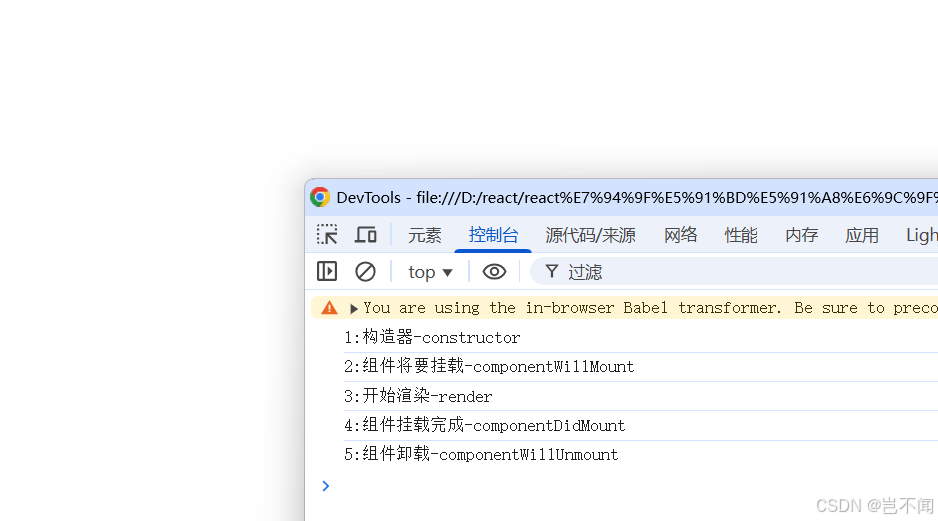
- componentWillUnmount() {
- console.log('5:组件卸载-componentWillUnmount');
- }
点击卸载dom后
整体代码- <!DOCTYPE html><html lang="en"><head> <meta charset="UTF-8"> <meta http-equiv="X-UA-Compatible" content="IE=edge"> <meta name="viewport" content="width=device-width, initial-scale=1.0"> <title>Hello,React生命周期(旧)</title></head><body> <!-- 容器 --> <div id="test"></div> <!-- {/* // 引入 React焦点库 */} --> <script src="https://unpkg.com/react@16/umd/react.production.min.js"></script> <!-- {/* // 引入 react-dom 用于支持 react 操纵 DOM */} --> <script src="https://unpkg.com/react-dom@16/umd/react-dom.production.min.js"></script> <!-- {/* // 引入 babel:1. ES6 ==> ES5 2. jsx ==> js */} --> <script src="https://unpkg.com/babel-standalone@6/babel.min.js"></script> <!-- {/* // 引入 JSX 语法 */} --> <script type="text/babel"> // 1. 创建组件 class Count extends React.Component {
- // 构造器
- constructor(props) {
- console.log('1:构造器-constructor');
- super(props)
- // 初始化状态
- this.state = {count: 0}
- } add=()=>{ // 获取原状态 const {count} = this.state // 状态更新 this.setState({ count: count+1 }) } death=()=>{ ReactDOM.unmountComponentAtNode(document.getElementById('test')) }
- // 组件将要挂载
- componentWillMount() {
- console.log('2:组件将要挂载-componentWillMount');
- }
- // 组件挂载完成
- componentDidMount() {
- console.log('4:组件挂载完成-componentDidMount');
- }
- // 组件卸载
- componentWillUnmount() {
- console.log('5:组件卸载-componentWillUnmount');
- }
- render(){
- console.log('3:开始渲染-render');
- const {count} = this.state
- return(
- <div>
- <h2>当前的和为{count}</h2>
- <button onClick={this.add}>点我+1</button>
- <button onClick={this.death}>卸载DOM</button>
- </div>
- )
- } } ReactDOM.render(<Count />,document.getElementById('test')) </script></body></html>
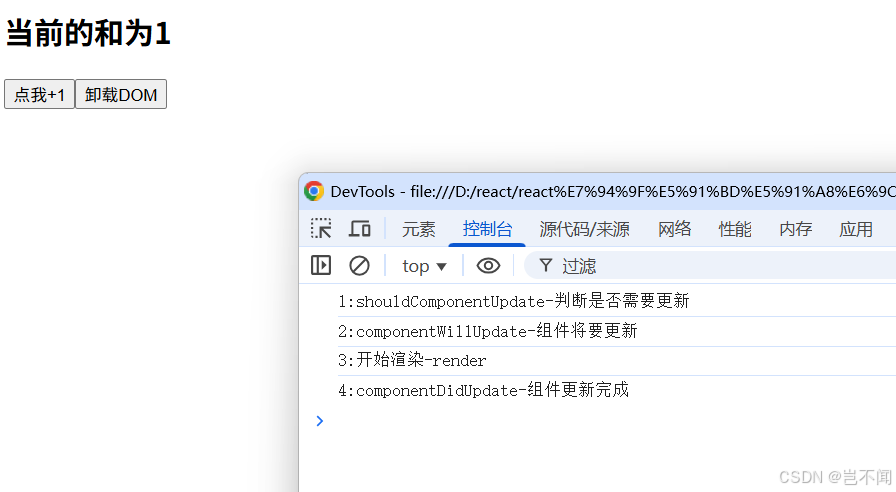
1:shouldComponentUpdate-判定是否须要更新- // 控制组件更新 默认不写此钩子函数 返回true 组件更新
- shouldComponentUpdate(nextProps, nextState) {
- console.log('1:shouldComponentUpdate-判断是否需要更新');
- return true
- }
- // 组件将要更新
- componentWillUpdate(nextProps, nextState) {
- console.log('2:componentWillUpdate-组件将要更新');
- }
-
- render(){
- console.log('3:开始渲染-render');
- const {count} = this.state
- return(
- <div>
- <h2>当前的和为{count}</h2>
- <button onClick={this.add}>点我+1</button>
- <button onClick={this.death}>卸载DOM</button>
- </div>
- )
- }
- // 组件更新完成
- componentDidUpdate(prevProps, prevState) {
- console.log('4:componentDidUpdate-组件更新完成');
- }
- // 组件卸载
- componentWillUnmount() {
- console.log('5:组件卸载-componentWillUnmount');
- }
- <!DOCTYPE html><html lang="en"><head> <meta charset="UTF-8"> <meta http-equiv="X-UA-Compatible" content="IE=edge"> <meta name="viewport" content="width=device-width, initial-scale=1.0"> <title>Hello,React生命周期(旧)</title></head><body> <!-- 容器 --> <div id="test"></div> <!-- {/* // 引入 React焦点库 */} --> <script src="https://unpkg.com/react@16/umd/react.production.min.js"></script> <!-- {/* // 引入 react-dom 用于支持 react 操纵 DOM */} --> <script src="https://unpkg.com/react-dom@16/umd/react-dom.production.min.js"></script> <!-- {/* // 引入 babel:1. ES6 ==> ES5 2. jsx ==> js */} --> <script src="https://unpkg.com/babel-standalone@6/babel.min.js"></script> <!-- {/* // 引入 JSX 语法 */} --> <script type="text/babel"> // 1. 创建组件 class Count extends React.Component { state = {count: 0} add=()=>{ // 获取原状态 const {count} = this.state // 状态更新 this.setState({ count: count+1 }) } death=()=>{ ReactDOM.unmountComponentAtNode(document.getElementById('test')) }
- // 组件卸载
- componentWillUnmount() {
- console.log('5:组件卸载-componentWillUnmount');
- }
- // 控制组件更新 默认不写此钩子函数 返回true 组件更新
- shouldComponentUpdate(nextProps, nextState) {
- console.log('1:shouldComponentUpdate-判断是否需要更新');
- return true
- }
- // 组件将要更新
- componentWillUpdate(nextProps, nextState) {
- console.log('2:componentWillUpdate-组件将要更新');
- }
- // 组件更新完成
- componentDidUpdate(prevProps, prevState) {
- console.log('4:componentDidUpdate-组件更新完成');
- }
- render(){
- console.log('3:开始渲染-render');
- const {count} = this.state
- return(
- <div>
- <h2>当前的和为{count}</h2>
- <button onClick={this.add}>点我+1</button>
- <button onClick={this.death}>卸载DOM</button>
- </div>
- )
- } } ReactDOM.render(<Count />,document.getElementById('test')) </script></body></html>
forceUpdate--》componentWillUpdate--》render--》componentDidUpdate--》componentWillUnmount
1.4父组件调用子组件render生命周期
componentWillReceiveProps--生命周期钩子函数---父组件调用子组件 第二次渲染,其他的调用子组件的生命周期如setState以后实行生命周期划一。
父组件A- // 创建组件A--父组件
- class A extends React.Component {
- // 初始化状态
- state={carName:'奥迪'}
- // 事件
- changeCarName=()=>{
- this.setState({
- carName: '宝马'
- })
- }
- render() {
- return (
- <div>
- <div>A组件</div>
- <button onClick={this.changeCarName}>修改车名</button>
- {/*将修改的车名传递给子组件--B*/}
- <B carName={this.state.carName} />
- </div>
- )
- }
- }
- // 创建组件B--子组件
- class B extends React.Component {
- // 生命周期钩子函数---父组件调用子组件 第二次渲染
- componentWillReceiveProps() {
- console.log('b--componentWillReceiveProps');
- }
- render() {
- return (
- // B--props 接收父组件传递的props
- <div>B组件,接收父组件传递的props:{this.props.carName}</div>
- )
- }
- }
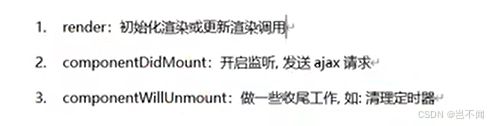
底子开辟中常用的生命周期钩子:
- componentDidMount:初始化做的事变,开启定时器,发送网络请求,订阅消息。
- render:渲染布局。
- componentWillUnmount:收尾,关闭定时器,取消消息。
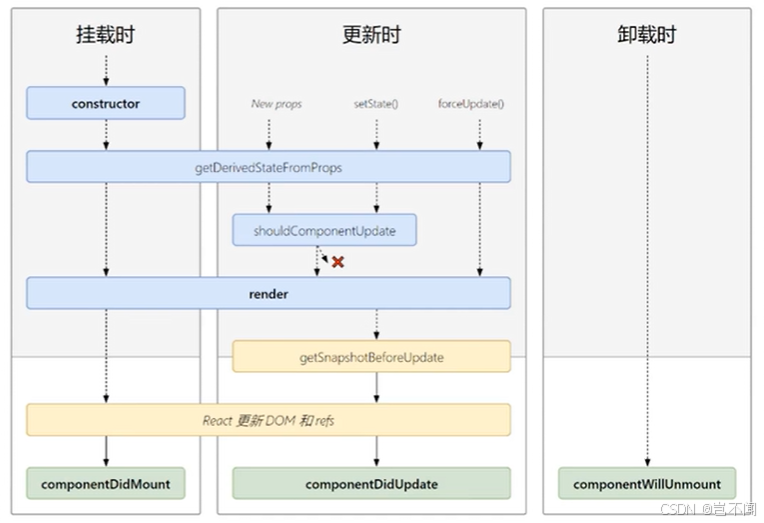
2.react生命周期(17)
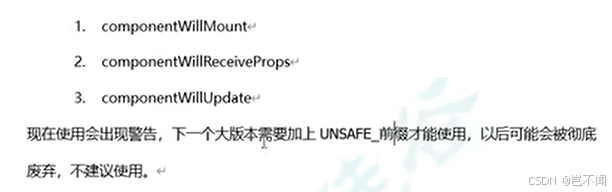
componentWillMount,componentWillReceiveProps,componentWillUpdate,在新的react17上中要加前缀UNSAFE。
2.1getDerivedStateFromProps静态生命周期方法(使用频率少)
答应组件在渲染前根据 props 的厘革更新其内部状态。它在 render() 方法之前被调用,重要用于处置惩罚那些状态依靠于 props 厘革的罕见场景。
1.留意
无法访问 this(即组件实例)
2.调用机遇:
组件首次挂载时(类似于 constructor)
props 更新时(父组件重新渲染或 props 发生厘革)
逼迫更新时(this.forceUpdate())
3.返回值:
必须返回一个对象来更新状态,或返回 null 表现不更新状态
返回的新状态对象会与现有状态归并
4.使用场景:
罕见情况下,状态须要依靠于 props 的厘革(比方,跟踪先前的 props 值)。
当 props 厘革时重置状态(比方,父组件通报的 prop 厘革时清空表单输入)。
5.代码展示:- class Example extends React.Component {
- state = {
- derivedValue: 0,
- prevValue: 0, // 用于存储先前的 prop 值
- };
- static getDerivedStateFromProps(nextProps, prevState) {
- // 仅在 props.value 变化时更新状态
- if (nextProps.value !== prevState.prevValue) {
- return {
- derivedValue: nextProps.value * 2, // 根据 prop 推导状态
- prevValue: nextProps.value, // 更新存储的先前 prop 值
- };
- }
- return null; // 无变化时不更新状态
- }
- render() {
- return <div>Derived Value: {this.state.derivedValue}</div>;
- }
- }
重要用于组件更新前捕获当前信息,并将信息通报给componentDidUpdate,便于更新后举行对应的调解,
调用机遇:在render后,DOM更新前:调用机遇介于render与componentDidUpdate间。
吸收参数:吸收两个参数,prevProps(更新前的props),prevState(更新前的state)。
使用场景:捕获DOM状态(列表更新,捕获滚动位置,更新后规复滚动位置)。
componentDidUpdate共同使用:getSnapShotBeforeUpdate返回值作为它的第三个参数(snapshot)通报。在此中根据snapshot的值举行对应的操纵。
使用getSnapShotBeforeUpdate保持滚动位置稳定:- import React from 'react';
- class ScrollingList extends React.Component {
- constructor(props) {
- super(props);
- this.listRef = React.createRef();
- this.state = {
- items: ['Item 1', 'Item 2', 'Item 3'],
- };
- }
- componentDidMount() {
- setInterval(() => {
- this.setState(prevState => ({
- items: [`New Item ${prevState.items.length + 1}`, ...prevState.items],
- }));
- }, 1000);
- }
- getSnapshotBeforeUpdate(prevProps, prevState) {
- // 捕获更新前的滚动位置
- if (prevState.items.length < this.state.items.length) {
- const list = this.listRef.current;
- return list.scrollHeight - list.scrollTop;
- }
- return null;
- }
- componentDidUpdate(prevProps, prevState, snapshot) {
- // 根据快照调整滚动位置
- if (snapshot !== null) {
- const list = this.listRef.current;
- list.scrollTop = list.scrollHeight - snapshot;
- }
- }
- render() {
- return (
- <div
- ref={this.listRef}
- style={{ height: '100px', overflow: 'auto', border: '1px solid black' }}
- >
- {this.state.items.map((item, index) => (
- <div key={index}>{item}</div>
- ))}
- </div>
- );
- }
- }
- export default ScrollingList;
免责声明:如果侵犯了您的权益,请联系站长,我们会及时删除侵权内容,谢谢合作!更多信息从访问主页:qidao123.com:ToB企服之家,中国第一个企服评测及商务社交产业平台。 |







 发表于 2025-9-20 01:53:04